Patta Chitta | Tamil Nadu Land Records
The Patta Chitta document is the backbone of land ownership records in Tamil Nadu. You might think of it as the government’s official acknowledgment of your land rights. For anyone dealing with land in Tamil Nadu, whether rural farmland or urban plots, Patta Chitta shows who legally owns the land and essential details about it. Over the past decade, the state government made these records easy to access online so you can check and download them anytime without long trips to local offices.
Patta Chitta Services
| Aspect | Details |
|---|---|
| Portal Name | Patta Chitta |
| Launched by | Government of Tamil Nadu |
| Purpose | Acts as official proof of land ownership |
| Key Information Included | Owner's Name, Patta Number, Survey Number, Sub Division Number, Land Area, Land Type, District |
| Importance | Proof of ownership at the time of the sale/ purchase of land |
| Official Website | eservices.tn.gov.in |
What is Patta Chitta?
Patta Chitta is the combined land record document used by the Tamil Nadu Revenue Department to show ownership and land details for properties across the state. It brings together two older records: Patta, which proves ownership rights, and Chitta, which lists land classification and history.
Today, both these parts are available as a single document which you can view and download online. Patta Chitta includes your name, survey number, subdivision number, land type, and area, and is the first officials document check during property verification.
Some key elements inside the patta chitta documents are:
Owner’s name and address
Patta number and survey number
Land area and type (wet or dry)
Classification and revenue details
Reference number for verification
Patta Chitta Benefits
Patta Chitta isn’t just a piece of paper. It’s your proof that the land really belongs to you. It can save a lot of trouble if you’re buying, selling, or even just checking your property details.
Here’s why it’s useful:
Clear legal proof of land ownership.
Getting loans or approvals becomes faster because the proof is official.
You can feel confident when selling or transferring property.
It shows exactly what kind of land you have and its size.
You can check and verify everything online without going anywhere.
How to Apply for Patta Chitta or Transfer Online
If you need a new Patta Chitta or have to transfer it after buying land, you can apply online through the official Tamil Nadu e-Services Portal. Here’s how I guide people step by step:
Open your browser and go to the official e-Services portal of Tamil Nadu at https://eservices.tn.gov.in.
Once you reach the homepage, look for the option “Apply for Patta Transfer / Change of Title.”
Click the link and fill out the online form with details such as :
Applicant Name
Patta Number
Survey Number
Land Details ( Like District, Taluk, Village)
Current Landowner Information.
Reason for TransferringUpload any supporting documents
Sale Deed
Proof Of Possession
Encumbrance Certificate
Aadhar Card / Voter ID Card
No Objection Certificate
Death Certificate (In Case)
Original AddressThen, pay the small fee (usually around ₹100) using the on-screen payment options.
Submit the application and note the application ID you receive.
You can track the application status at any time using this ID on the same portal.
This online method saves time and means you don’t have to stand in long queues at local offices. It’s worth checking regularly for status updates after submission.
Patta Chitta Services on Tamil Nadu e-Services Portal
On the Tamil Nadu e-Services Portal, you can access these services for land records:
View Patta Chitta, FMB, Chitta, or TSLR extracts – check your land records anytime.
Verify Patta Chitta authenticity – make sure your document is official.
Apply for Patta transfer or title change – update ownership without visiting the office.
Track application status – know exactly where your request stands.
View A-Register extracts – get historical land record information.
Check Poramboke land – see if any land is government-owned.
View or download FMB sketches – get a clear picture of your land boundaries.
How to Get Your Patta Chitta Online (Rural or Natham Land)
How to View Patta Chitta Online
- Go to the Tamil Nadu official land records website at https://eservices.tn.gov.in.
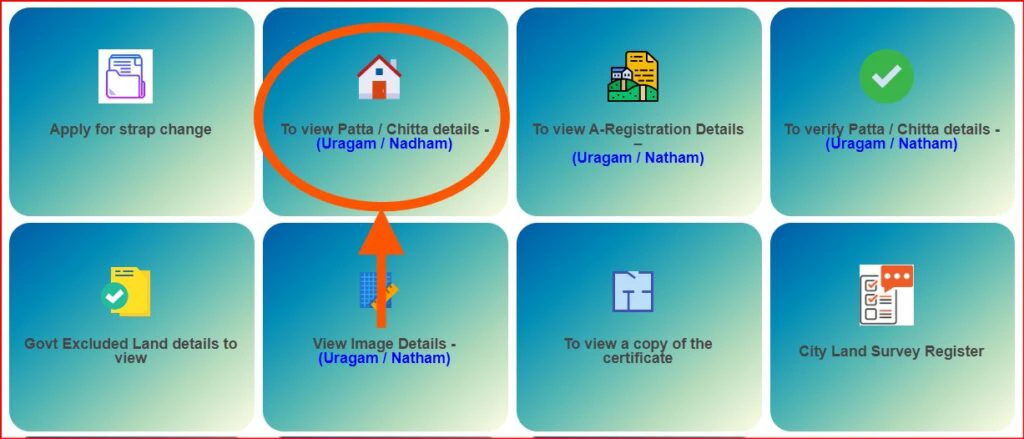
Click the link for “View Patta & FMB/Chitta/TSLR Extract.”
Select “Rural” if your land is village or Natham property.
Choose your District, Taluk, and Village.
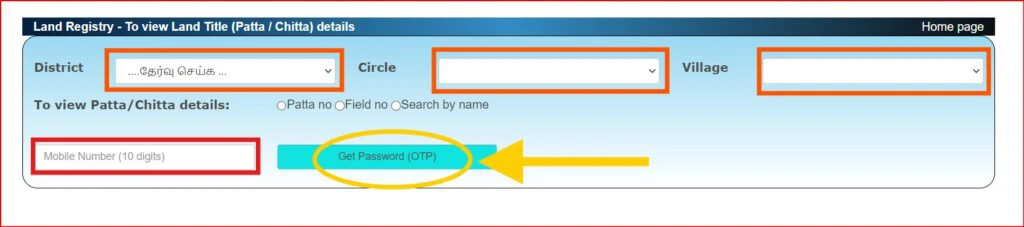
Enter your Patta number, Survey number, and Subdivision number.
Complete the CAPTCHA and provide your mobile number to get the OTP.
Enter the OTP and click submit to view your Patta Chitta document.
How to Download Patta Chitta
Once the record displays, you can download or print it. These steps work for most rural and village lands in Tamil Nadu.
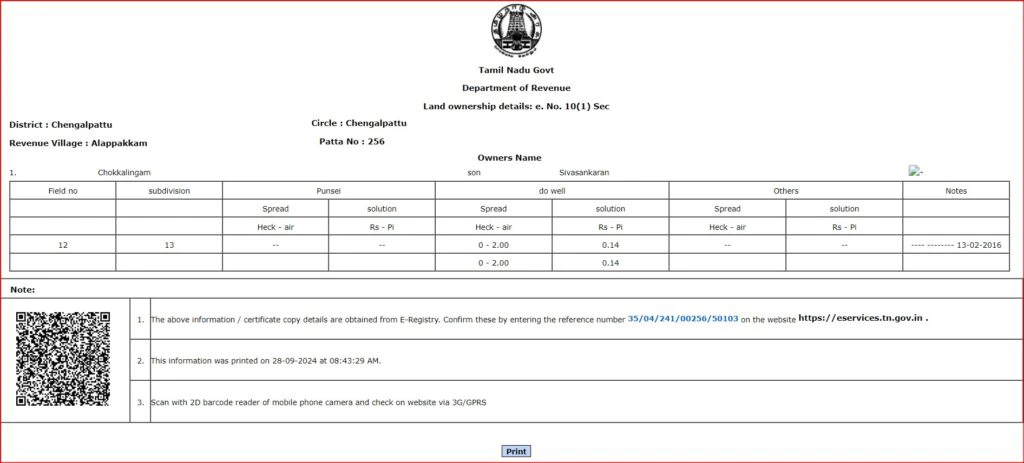
How to Verify Patta Chitta Online
Verifying your Patta Chitta ensures the document is authentic and matches the government’s records. On the Tamil Nadu e-Services portal:
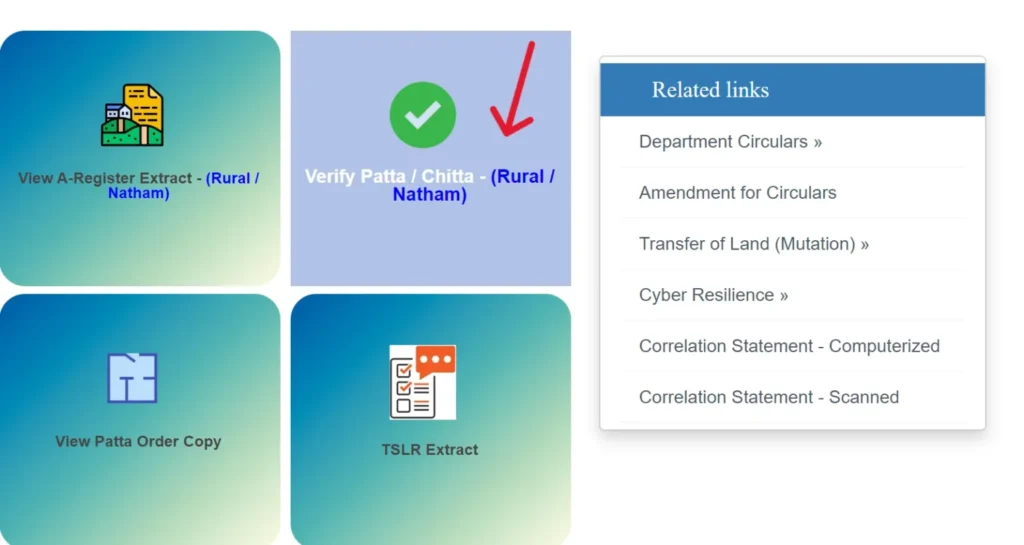
- Find the “Verify Patta/Chitta” function on the homepage.
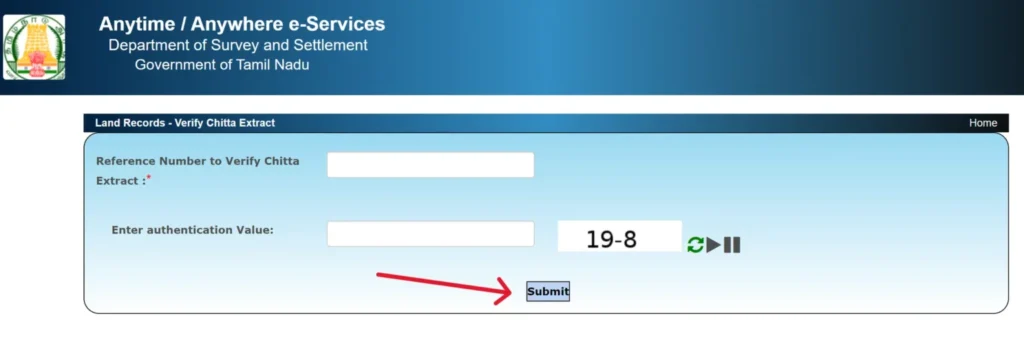
Enter the reference number printed on your Patta Chitta document.
Enter your mobile number and wait for the OTP.
Type the OTP and submit.
The system will confirm if the record is genuine.
Fees & Charges on Tamil Nadu Patta Chitta
| Service | Fees |
|---|---|
| Viewing Patta/Chitta/TSLR | Free |
| Downloading Patta/Chitta/TSLR | Free/Nominal |
| Viewing FMB Sketch | Free |
| Downloading FMB Sketch | Free |
| Patta Transfer Application | ₹100–₹300 |
| CSC Service Charge | ₹25–₹60 |
How to View TSLR Extract Online
If your property is in an urban or town area, you may need the Town Survey Land Register (TSLR) Extract. TSLR is like a Patta but specific to urban plots. To view it online:
- Visit the official portal at eservices.tn.gov.in.
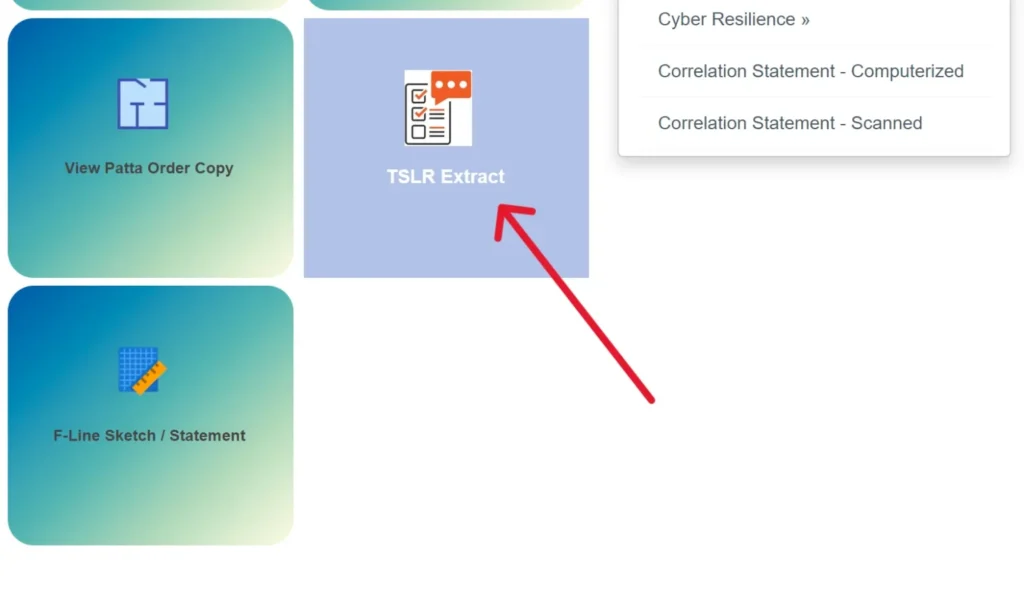
Click the “TSLR Extract” option.
Choose your District, Taluk or Town, Ward, and Block.
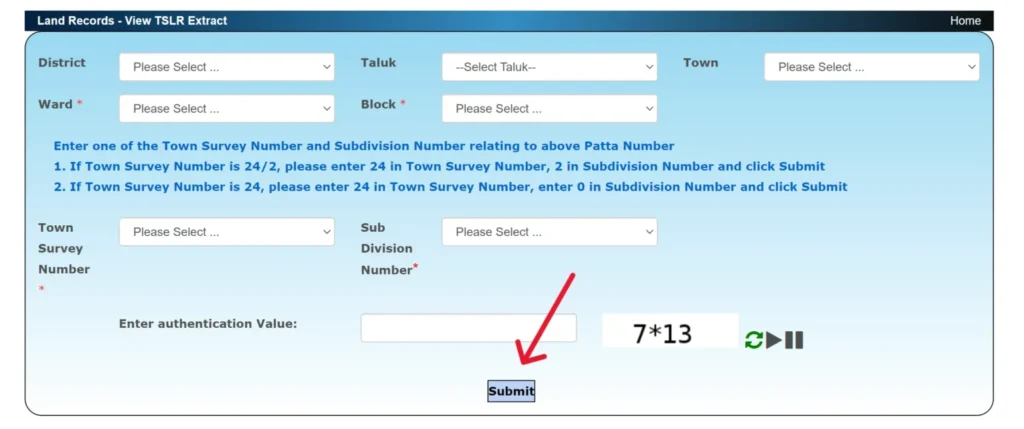
Enter your Town Survey Number and Subdivision number.
Fill in the CAPTCHA and click submit to view your TSLR extract.
View FMB (Feild Measurement Book)
The Field Measurement Book (FMB) sketch shows the layout and boundaries of your land. It’s useful when surveying land borders or preparing sale documents. To view an FMB sketch online:
Go to the Tamil Nadu land records portal.
Select “View FMB Sketch.”
Choose your land area type (Rural or Urban).
Enter your District, Taluk (or Town/Block/Ward for urban), and your Survey and Subdivision numbers.
Complete the CAPTCHA and OTP steps.
Your FMB sketch will appear, and you can save it.
This map helps confirm the exact shape and boundaries of your land plot.
Patta Chitta in Different Places
Patta Chitta may sound uniform, but official land records work differently across regions:
-
Patta Chitta Chennai — Uses TSLR Extract for city properties.
-
Patta Chitta Coimbatore — Rural plots use traditional Patta Chitta; city plots use TSLR.
-
Patta Chitta Tamil Nadu (statewide) — All districts, whether rural or urban, have land records on the e-Services portal.
Each area may label or organize records slightly differently, but they all feed into the same state land records system.
Special Land Types
Some specific land categories have unique treatments in records:
Patta Chitta Natham — Village residential land.
UDR Patta (Urban Development Record) — For urbanized zones.
Nilavaram/Maruthal — Farm or open lands.
Nagaram — Urban municipal properties.
These classifications help officials manage records and determine which online forms and extracts you need.
Contact Details
| Detail | Information |
|---|---|
| Managing Authority | Commissionerate Of Survey & Settlement, Government Of Tamil Nadu |
| Address | Survey House, Chepauk, Chennai-600005 |
| Helpline Number | 1100 |
| dir-sur@nic.in | |
| Official Website: | eservices.tn.gov.in |
FAQs - Patta Chitta
Q: What is Patta Chitta?
A: Patta Chitta is the official land record document used in Tamil Nadu. It shows who owns the land and key property details like survey number, land type, and area.
Q: How can I check Patta Chitta online?
A: You can check Patta Chitta on the Tamil Nadu e‑Services Portal (eservices.tn.gov.in). You select your district, enter your survey number or Patta number, then verify with an OTP sent to your phone.
Q: Can I download Patta Chitta online?
A: Yes, Once you view your Patta Chitta on the portal, you can download it as a PDF for your records. You don’t need to visit the office for this.
Q: How do I check the online status of my Patta Chitta application?
A: On the same portal, there’s a section for Application Status. You enter the application ID you got when you applied and you’ll see the current progress.
Q: Do I need to pay any fees to view or download Patta Chitta?
A: Viewing and downloading Patta Chitta online is usually free. Some advanced services like certified copies or transfers might have a small fee.
Q: What is a TSLR Extract?
A: TSLR Extract is a land record for urban properties. It’s similar to Patta Chitta but used for towns and cities. You can view or download it from the Tamil Nadu e‑Services Portal.
Q: How can I view TSLR Extract online?
A: Go to the portal, click the TSLR Extract option, select your district and town info, enter the town survey number and subdivision number, then submit to see the extract.
Q: What is View FMB (Field Measurement Book)?
A: FMB shows the exact boundaries of your land. It’s like a simple map you can view or download online from the same land records portal.
Q: What details do I need to view Patta Chitta online?
A: You usually need district, taluk, village (for rural), survey number or Patta number, and a mobile number for OTP verification.
Q: Can I view my Patta Chitta on mobile?
A: Yes. You can open the official portal on your phone browser and check or download records the same way you do on a computer.